Cloud Security
Google Cloud Forensics: Investigating an Incident
An investigation in Google Cloud can only use the evidence that was being collected before the incident. Most of the gaps are settings nobody changed, such as Data Access audit logs left off, no flow logs, short retention, and logs stored where the attacker could reach them. This article covers what to set up now.

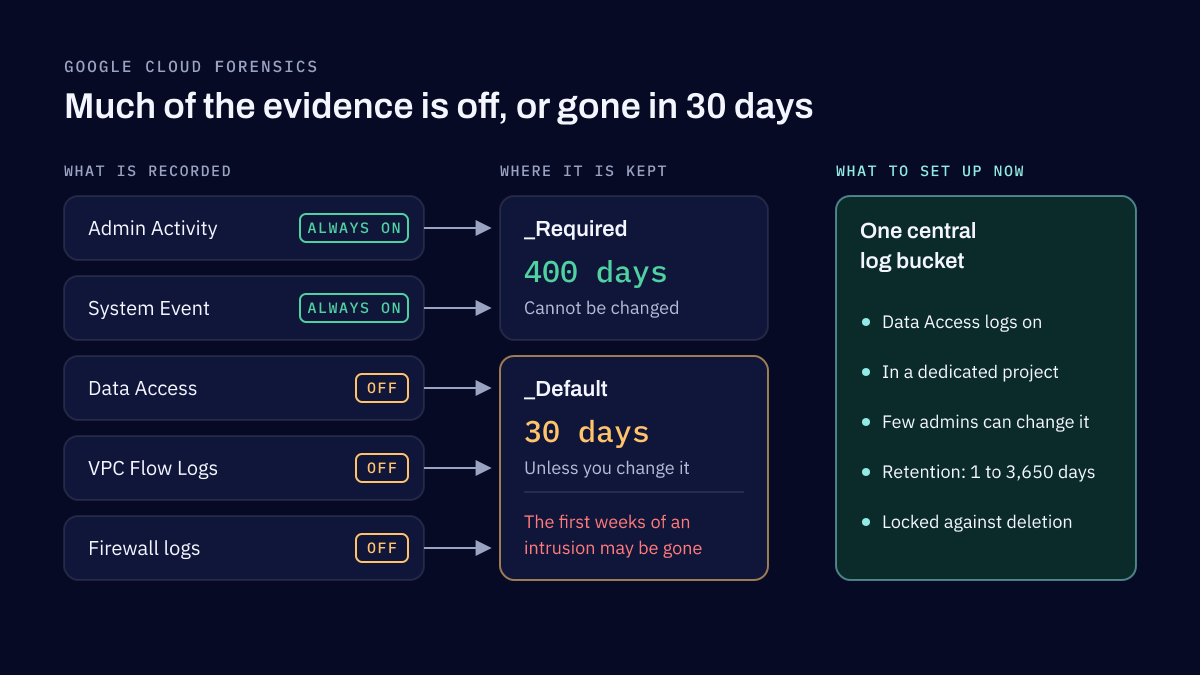
Cloud forensics in Google Cloud depends on evidence that has to exist before the incident: audit logs, network logs and snapshots, kept long enough and somewhere an attacker cannot reach. Admin Activity audit logs are always on, but Data Access audit logs, VPC Flow Logs and firewall logs are off until you turn them on, and most logs are kept for only 30 days by default. The work is mostly done in advance, by deciding what to collect, where to keep it, for how long, and who can touch it.
Retention matters more than it seems. Mandiant's M-Trends 2026 reports that the global median time an attacker stayed undetected rose to 14 days from 11, and warns that with some threats staying hidden for nearly 400 days, "standard 90-day log retention policies leave organizations completely blind to the initial access vector and the full scope of the intrusion."
What is usually missing when the evidence is needed
When an investigation in Google Cloud needs evidence, the gaps I find are nearly always the same four:
- Data Access audit logs were never enabled. They record who read or changed data, which is often the question that matters. Except for BigQuery, they are off by default, because they can be large and they add to log charges.
- No VPC Flow Logs. Without them there is no record of which machines talked to which, or how much data left.
- Retention was too short. The 30-day default had already deleted the first weeks of the intrusion.
- The logs were where the attacker could reach them. Logs kept in the same project, administered by the same accounts that were compromised, can be changed or deleted along with everything else.
None of these is hard to fix. All of them are hard to fix after the fact.
The logs Google Cloud keeps, and the ones it does not
Cloud Audit Logs come in four kinds. Admin Activity and System Event logs are always written and cannot be disabled. Policy Denied logs are written by default. Data Access logs are the ones you have to switch on, service by service, at the organization, folder or project level.
Storage follows two built-in buckets. The _Required bucket keeps Admin Activity and System Event logs for 400 days, and that cannot be changed. Everything else lands in the _Default bucket, kept for 30 days unless you change it. A bucket you create can keep logs from 1 day to 3,650 days.
Network evidence is separate. VPC Flow Logs can now be enabled for a whole organization or VPC network, not only subnet by subnet. Firewall rules logging is set for each rule whose connections you need to record.
Google also records its own staff's access to your data in Access Transparency logs, now a default control for every organization. In an investigation, they help rule Google's access in or out.
Set it up before you need it
The readiness work comes down to five steps, and most of it is a one-time design.
- Turn on the audit logs that matter. Enable Data Access audit logs at least for the services that hold sensitive data, such as Cloud Storage, Cloud SQL and Secret Manager, at the organization level so new projects inherit them. Balance the volume against the cost, but decide on purpose.
- Centralize logs in a secured project. An aggregated sink at the organization or folder level routes logs from every project below it to one destination. Put that destination in a dedicated project with its own small group of administrators.
- Set retention and lock it. Choose a retention period on the central bucket that matches how long an intrusion might go unnoticed and what your regulators expect. Then lock the bucket: a locked bucket cannot be updated or deleted, and its retention policy is locked with it. Locking is irreversible and is done from the command line or the API, not the console.
- Control who can change logging. The Logging admin and configuration writer roles can create, change and delete sinks and buckets. Keep them to a few people, and remember that reading Data Access logs needs the private log viewer role, which should be just as rare.
- Make the logs searchable. Observability Analytics, the new name for Log Analytics, lets you query an upgraded log bucket with SQL, and link it to BigQuery without copying the data. During an investigation, a query that runs in seconds over a year of logs is the difference between a timeline and a guess.
Most of this belongs in the foundation of a Google Cloud environment, which is why we set up logging and guardrails before the first workload arrives in our cloud transformation work.
Preserving evidence from VMs and containers
Logs show what happened through the APIs. What happened inside a machine is on its disk. A Compute Engine snapshot captures a disk at a point in time, even while the VM is running, and a machine image captures every disk of a VM at once. The rule is to take them before anything is restarted, rebuilt or deleted.
For GKE, audit logs cannot be disabled and system and application logs go to Cloud Logging by default, but logs kept on the nodes are removed periodically. Google's guide to mitigating security incidents on GKE puts the snapshot first: take a snapshot of the host VM's disk, so it can be examined after the workload has been redeployed or deleted.
Write these steps down as a procedure, with who can run them and where the snapshots go, before anyone needs them under pressure.
Reconstructing what happened
With the evidence in place, an investigation follows the identity. Admin Activity logs show which account created a key, changed a policy or started a VM, and from where. Data Access logs show what that account read. Flow logs show where the data went. A timeline built from those three sources answers most of the questions a business, an insurer or a regulator will ask.
Without them, the honest answer is often "we cannot tell", which is the most expensive answer there is.
Test that it works
A readiness plan is only as good as its last test. Once a year, or after a major change, pick a scenario, such as a stolen service account key, and check that you can answer the basic questions from the logs alone: when the key was created, what it accessed, and what left the network. If an answer is missing, you have found your next setting to change.
A cloud security review checks logging along with identity, network exposure and storage, and a SIEM implementation puts the same logs to work detecting attacks, not only explaining them afterwards. The same logging also matters for ransomware protection, where the first sign of an attack is often a change to the backups.
Frequently asked questions
Which Google Cloud logs are on by default?
Admin Activity and System Event audit logs are always written and cannot be turned off, and they are kept for 400 days in the _Required bucket. Data Access audit logs are off by default for every service except BigQuery. VPC Flow Logs and firewall rules logging are off until you enable them.
How long does Google Cloud keep logs?
Logs in the _Required bucket are kept for 400 days, which you cannot change. Logs in the _Default bucket are kept for 30 days unless you set a custom retention. A log bucket you create can keep logs from 1 day to 3,650 days, about ten years.
How do I stop an attacker from deleting Google Cloud logs?
Route them with an aggregated sink to a log bucket in a separate project that few people can administer, and lock that bucket. A locked bucket cannot be updated or deleted, and its retention policy is locked with it. Restrict who holds the Logging admin and configuration writer roles, since those can change sinks and buckets.
How do I preserve evidence from a compromised VM in Google Cloud?
Take a snapshot of its disks before you change, redeploy or delete anything; snapshots can be taken while the disk is attached to a running VM. For several disks at once, create a machine image. Google's GKE guidance puts the same step first for a node, so the host VM's disk can be examined after the workload is gone.
Sources
- Cloud Audit Logs overview, Google Cloud, 2026
- Store log entries, Google Cloud, 2026
- Route log entries, Google Cloud, 2026
- Configure log buckets, Google Cloud, 2026
- Analyze logs using Logs Explorer and Observability Analytics, Google Cloud, 2026
- VPC Flow Logs, Google Cloud, 2026
- VPC firewall rules logging overview, Google Cloud, 2026
- Overview of Access Transparency, Google Cloud, 2026
- About GKE logs, Google Cloud, 2026
- Mitigate security incidents, Google Cloud, 2026
- Cloud Logging access control, Google Cloud, 2026
- M-Trends 2026: Data, Insights, and Strategies From the Frontlines, Mandiant, Google Cloud, 2026
Application security services and cloud security
We review the applications you build, assess and harden the AWS, Microsoft Azure or Google Cloud accounts they run in, and design how the data they hold is protected. Reviews follow OWASP, and cloud work follows the CIS Benchmarks.
Related reading
Cloud Security
GCP Ransomware Protection: Cloud Strategies
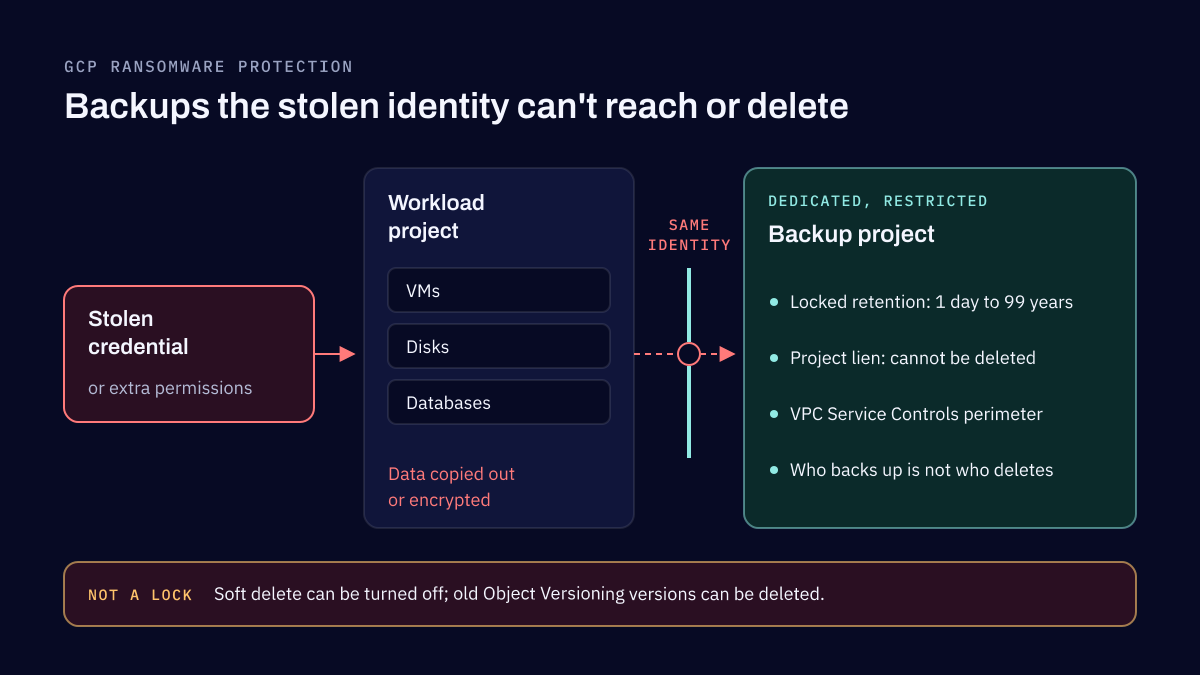
Ransomware in Google Cloud usually starts with a stolen credential or a permission that was too wide, and it does the most damage when the backups can be reached too. Protection comes down to strong sign-in for administrators, least privilege, backups no one can delete, kept apart from the workloads, and a restore you have tested.
Business Continuity
Microsoft 365 went down and Microsoft tenants were breached: can your business keep running?
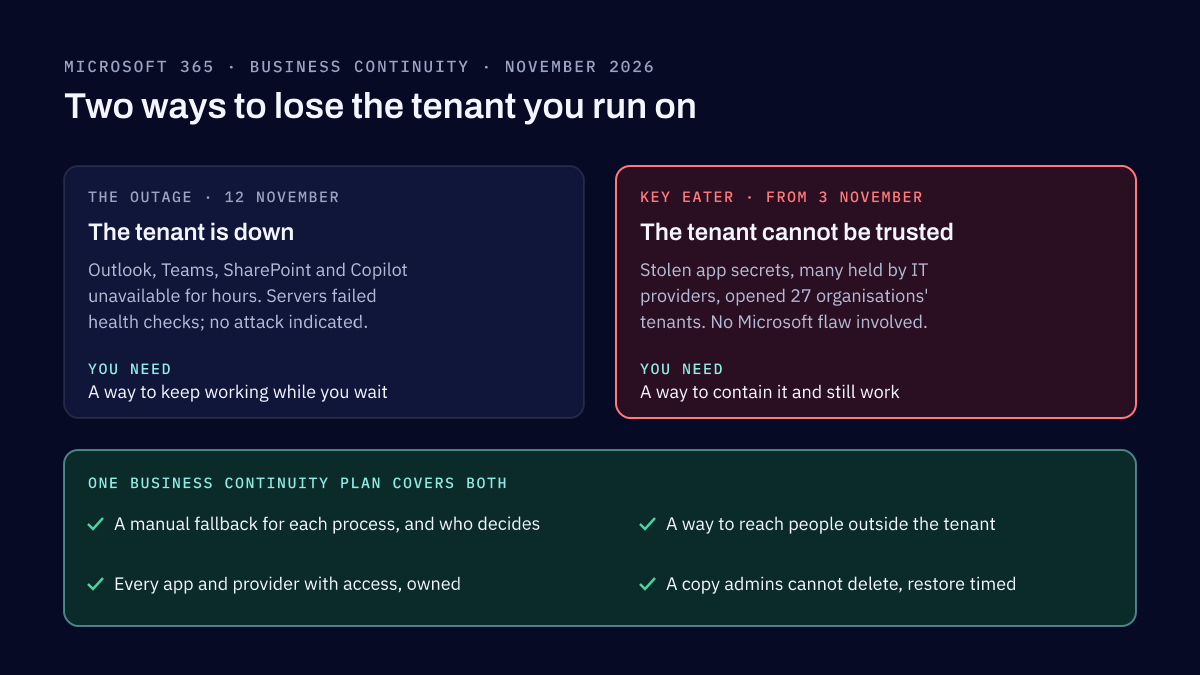
On 12 November 2026 a Microsoft 365 outage cut companies off from Outlook, Teams and Copilot for hours. The same month, stolen app credentials opened 27 organisations' Microsoft tenants, many through their IT providers. Neither was a Microsoft hack, and both test the same business continuity plan.
Tell us what you need reviewed
Name the applications, cloud accounts or data in question, and any deadline. We reply within two business days.