Kubernetes and Containers
Binary Authorization on GKE: a rollout that does not block deployments
Binary Authorization makes GKE check every container image against a policy before it deploys, and lets only images signed by the attestors you trust run. Roll it out in dry-run mode first, sign image digests in CI after the build and the scan pass, and keep exemptions and break-glass for real emergencies.

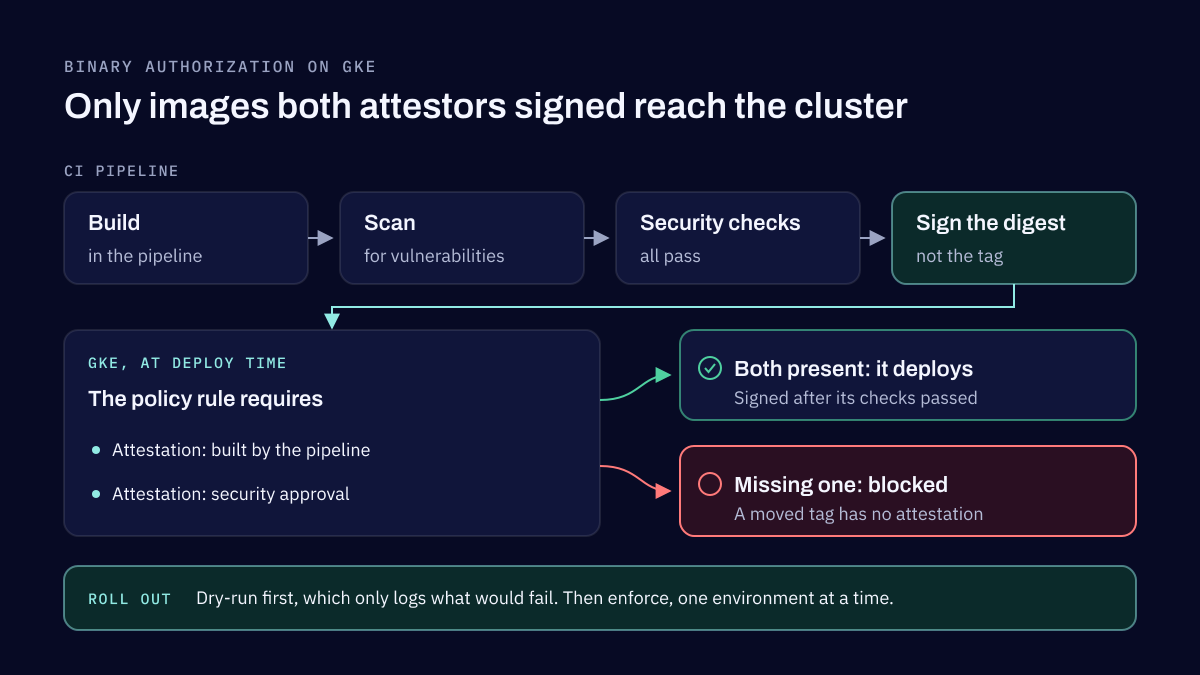
GKE Binary Authorization checks every container image against a policy at deploy time and blocks the images that fail it. With a policy that requires attestations, an image runs only if attestors you trust have signed its digest, for example after it was built by your pipeline and passed its vulnerability scan. The safe way to roll it out is in dry-run mode first, so you see what would be blocked before anything is.
This article is part of our Google Cloud and Kubernetes series. The overview of container security best practices explains where it fits among the other controls.
How a policy works
Binary Authorization works on GKE, Cloud Run, Cloud Service Mesh and Google Distributed Cloud. Each Google Cloud project has one policy, which Google calls the project-singleton policy. It holds a default rule, applied to every deployment that no other rule matches, and on GKE it can hold more specific rules for a cluster, a Kubernetes namespace or a Kubernetes ServiceAccount.
Each rule has an evaluation mode: allow all images, disallow all images, or require attestations. It also has an enforcement mode: block and write an audit log entry (ENFORCED_BLOCK_AND_AUDIT_LOG), or write the audit log entry only (DRYRUN_AUDIT_LOG_ONLY). Every decision is recorded in Cloud Audit Logs.
An attestation is a signed statement about one image, identified by its registry path and digest. Because it signs the digest, not a tag, a tag moved to a different image does not carry the attestation with it. An attestor holds the public key that verifies attestations of a given kind. Keys are PKIX keys, which can live in Cloud Key Management Service, or PGP keys, and each attestor has a note in Artifact Analysis where its attestations are stored.
The rollout we recommend
We start in dry-run mode. With DRYRUN_AUDIT_LOG_ONLY, every image deploys as before, and each one that would have failed the policy is written to Cloud Audit Logs. Those logs show which workloads, system components and third-party images the policy would have stopped, before it can stop anything.
Then we configure attestors for what the organisation actually trusts: one for images built by the trusted pipeline, and one for security approval. The pipeline signs the image digest after a successful build, after the vulnerability scan and after the other security checks pass, and before deployment. A rule that requires both attestations then means an image reaches the cluster only if it came from the pipeline and passed its checks.
When the dry-run logs are clean, we switch the rule to enforcement, one environment at a time. In the console that means clearing dry-run mode for the rule; with gcloud, export the policy, change enforcementMode to ENFORCED_BLOCK_AND_AUDIT_LOG and import it again. Google notes the change can take a few minutes to take effect.
What teams get wrong
Exemptions that are too broad. Exempt images are listed by name pattern in admissionWhitelistPatterns, and a pattern can match a whole registry or a whole directory tree. A wide pattern added to unblock one deployment quietly exempts everything else under it. Keep each exemption to the narrowest pattern that works, ideally a digest, and review the list as you would a firewall rule.
Policies that differ between environments. A policy that is enforced in production but allows everything in staging means images reach production without ever having been checked the same way before. Use the same rules everywhere and differ only in enforcement mode while you roll out.
Misusing break-glass. Break-glass is the emergency override: a pod labelled image-policy.k8s.io/break-glass: "true" deploys even when the policy would block it. Every such deployment is written to Cloud Audit Logs, whether it passed the policy or not. It is meant for incidents, not as a routine way around a failed check. Alert on those log entries so each use is seen and explained.
Forgetting GKE's own system images. A policy that blocks everything unsigned also blocks the images GKE needs to run the cluster. Google's setting for this is "Trust all Google-maintained system images", the globalPolicyEvaluationMode property set to ENABLE, and Google advises against using exempt image patterns for system images instead. Validating the policy in dry-run before enforcing it catches the rest.
If you have time for one control
If a team has time for only one supply chain control on GKE, we would start with automated image scanning integrated into CI/CD, so known vulnerabilities are found before an image ships. On Google Cloud, Artifact Analysis can scan images pushed to Artifact Registry once scanning is enabled, and can scan on demand inside the pipeline. Binary Authorization comes next: it turns those checks into a rule the cluster enforces, verifies that only trusted images deploy and blocks the ones nobody approved.
The order follows from what each control does. Scanning tells you an image has a problem. Binary Authorization makes sure an image that did not pass the checks cannot be deployed anyway.
Continuous validation today
Deploy-time enforcement checks an image once, when it deploys. Continuous validation checks the images of pods that are already running, so you hear about one that no longer meets the policy. Its older form, legacy continuous validation with project-singleton policies, was shut down on 1 May 2025. Its replacement, continuous validation with check-based platform policies, is in Preview at the time of writing. It is set per cluster, can check for vulnerabilities, Sigstore attestations, SLSA build provenance and trusted directories, and writes findings to Cloud Logging. It monitors; it does not block.
The rest of the series
Binary Authorization decides which images run. Workload Identity Federation for GKE decides what those workloads can reach in Google Cloud, and Shielded GKE Nodes protect the nodes they run on.
Our Engineering Security service adds security checks to your build and release pipeline, including scanning container images before they are pushed, and hardens the GKE clusters that enforce them. Data, Application & Cloud Security reviews the open source components and secrets in what you build.
Sources
- Binary Authorization overview, Google Cloud, 2026
- Binary Authorization policy concepts, Google Cloud, 2026
- Enable dry-run mode, Google Cloud, 2026
- Use break-glass, Google Cloud, 2026
- Legacy continuous validation deprecation, Google Cloud, 2026
- Container scanning overview, Google Cloud, 2026
DevSecOps consulting and engineering security
We build security into how your software is designed, built and run, from the checks in your pipeline to the configuration of your Kubernetes clusters and the coding standards your developers follow. Everything we set up is handed to your team to own.
Related reading
Kubernetes and Containers
Shielded GKE Nodes: what they protect and what they do not
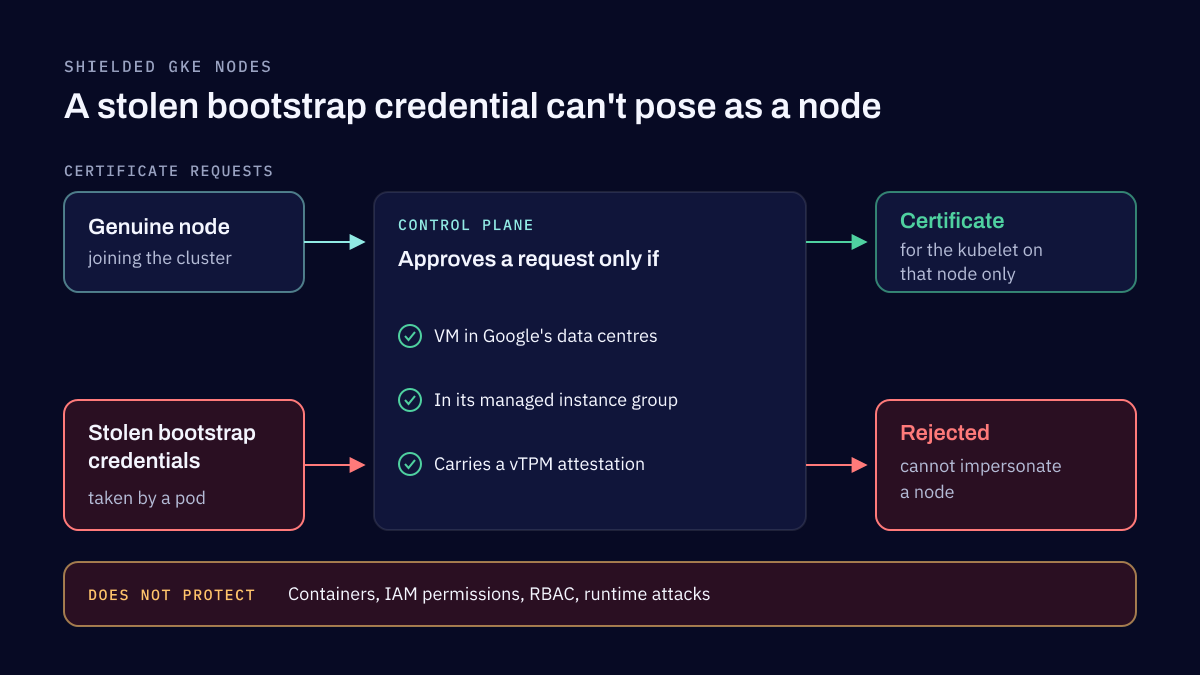
Shielded GKE Nodes prove to the control plane that each node is a genuine VM of your cluster, so an attacker who steals a node's bootstrap credentials cannot impersonate it. Secure Boot and integrity monitoring add checks on how the node started. They protect the node, not the workloads running on it.
Kubernetes and Containers
Workload Identity Federation for GKE: access without keys
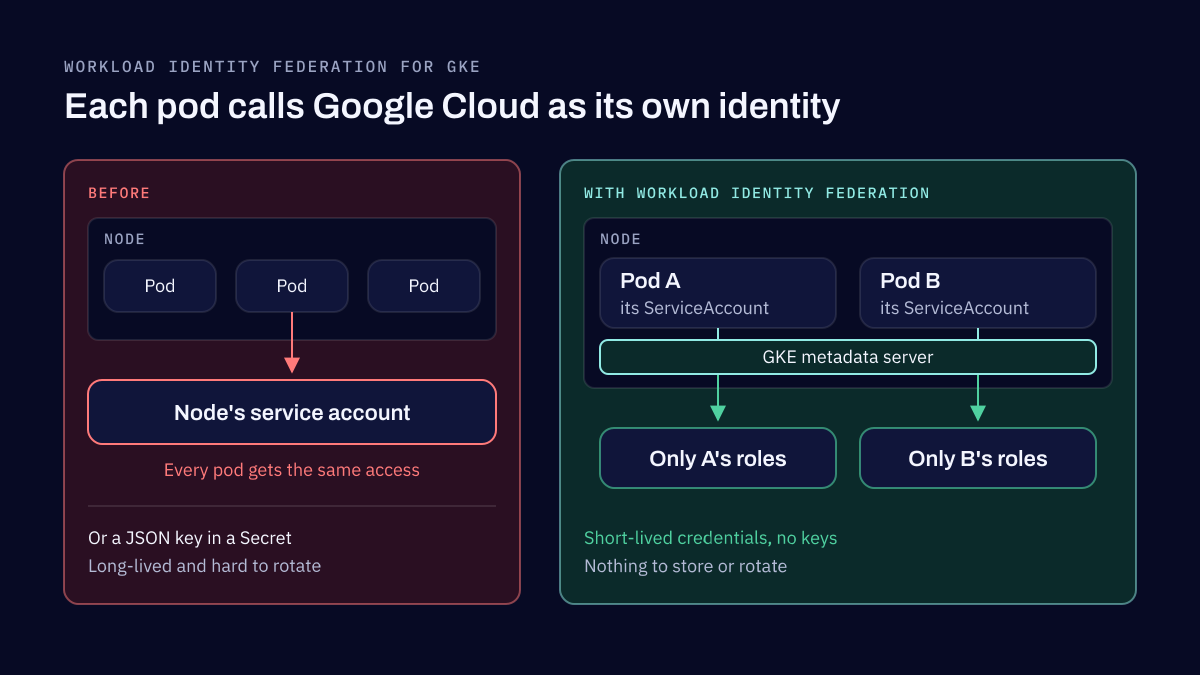
Workload Identity Federation for GKE lets a Kubernetes workload call Google Cloud APIs as its own identity, with short-lived credentials and no service account key to store or rotate. It removes a whole class of leaked credentials, but only if each workload gets its own identity and only the access it needs.
Tell us how your software is built and shipped
Name the languages, the pipeline and where it runs. We reply within two business days.