Kubernetes and Containers
Workload Identity Federation for GKE: access without keys
Workload Identity Federation for GKE lets a Kubernetes workload call Google Cloud APIs as its own identity, with short-lived credentials and no service account key to store or rotate. It removes a whole class of leaked credentials, but only if each workload gets its own identity and only the access it needs.

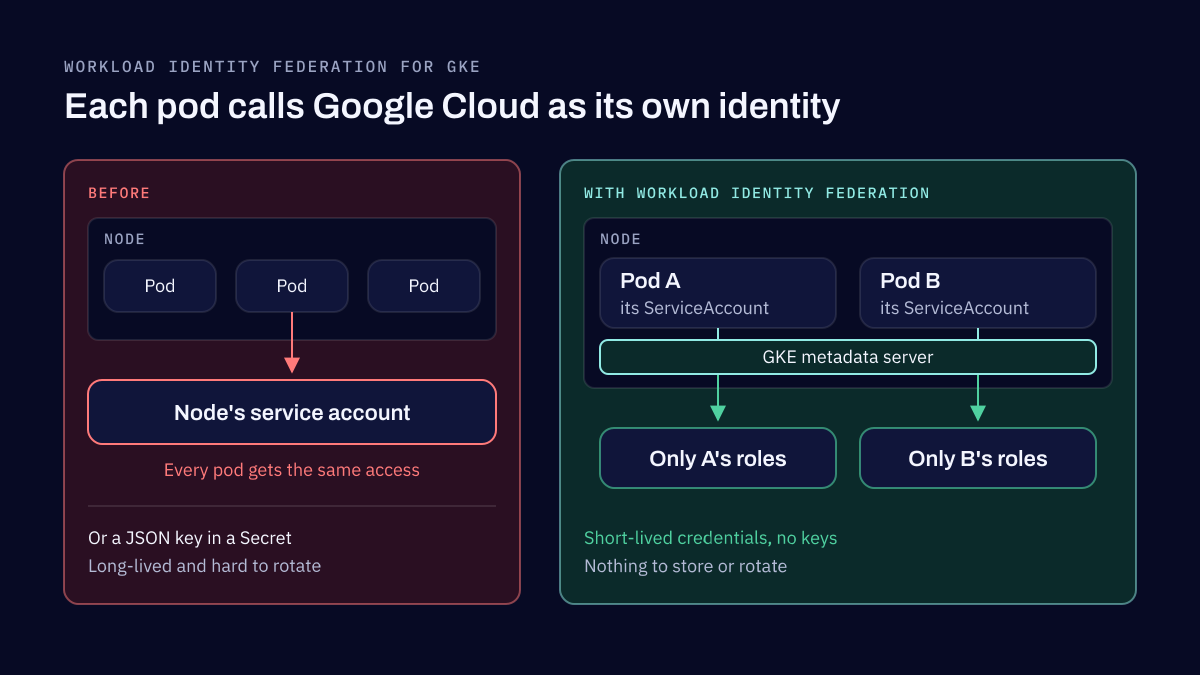
Workload Identity Federation for GKE lets a pod authenticate to Google Cloud APIs as itself. You grant IAM roles to the pod's Kubernetes ServiceAccount, and GKE exchanges that identity for short-lived Google Cloud credentials when the pod needs them. No service account key is created, stored in a secret or rotated, which is why Google calls it the recommended way for GKE workloads to reach Google Cloud APIs.
This article is part of our Google Cloud and Kubernetes series. The overview of container security best practices explains where it fits among the other controls.
How workloads reached Google Cloud before
On the GKE clusters we have worked on, workloads used to reach Google Cloud in one of two ways. Some used exported service account keys: a JSON file created in IAM, stored as a Kubernetes Secret or built into the image, and read by the application. Others used no credentials of their own and inherited the permissions of the node's service account.
Both caused the same three problems. The keys could be exposed, because a long-lived key copied into secrets, images and laptops is only as safe as the least protected copy. Rotation was hard, so it was often not done, and a key could stay valid for years. And privileges were too wide. With the node's service account, every pod on the node had the same access, so the permissions had to cover the most demanding workload, and a compromised pod with no business calling Cloud Storage could still do it.
How it works
The cluster gets a workload identity pool named after the project, PROJECT_ID.svc.id.goog. On every node, the GKE metadata server intercepts requests that pods make to the metadata endpoint and answers them with credentials for the pod's own Kubernetes ServiceAccount, rather than the node's.
In IAM, you grant roles directly to that Kubernetes ServiceAccount, using a principal identifier that names the project, the namespace and the ServiceAccount:
principal://iam.googleapis.com/projects/PROJECT_NUMBER/locations/global/workloadIdentityPools/PROJECT_ID.svc.id.goog/subject/ns/NAMESPACE/sa/KSA_NAME
Google documents this direct grant as the preferred method. The older method, linking the Kubernetes ServiceAccount to an IAM service account, is still supported for the APIs that do not yet accept the direct form. It needs two things: the roles/iam.workloadIdentityUser role granted on the IAM service account, and the iam.gke.io/gcp-service-account annotation on the Kubernetes ServiceAccount. Both are required.
On Autopilot clusters the feature is always on. On Standard clusters you enable it on the cluster with --workload-pool=PROJECT_ID.svc.id.goog, and on each node pool with --workload-metadata=GKE_METADATA. Setting the node pool flag explicitly is worth it, because node pool creation then fails if the cluster does not have the feature enabled, instead of silently falling back to the node's service account.
The mistakes that leave access too wide
Moving to Workload Identity Federation removes the keys. It does not, on its own, give you least privilege. The mistakes we see most often are these.
IAM bindings that are too broad. A role granted at the project level when the workload needs one bucket, or a basic role such as Editor granted because it was quicker. Grant roles on the specific resource where you can, and choose the narrowest predefined role that works.
One identity shared by unrelated workloads. When several applications use the same Kubernetes ServiceAccount, or are linked to the same IAM service account, each one carries the access of all the others. Give every workload its own ServiceAccount, so that its permissions describe what that one application does.
Weak namespace isolation. The principal identifier names the namespace and the ServiceAccount, not the cluster. Google calls this identity sameness: a ServiceAccount with the same namespace and name in two clusters of the same project is treated as the same identity, and gets the same access. That is useful for a service that runs in several clusters. It also means anyone who can create that ServiceAccount in that namespace, in any cluster in the project, inherits its access. Control who can create ServiceAccounts and namespaces, keep clusters you trust less in a separate project, or limit access to particular clusters with IAM conditions, as Google suggests.
When not to use it
We recommend Workload Identity Federation by default. The exceptions are compatibility limits. Pods that run on the host network (hostNetwork: true) do not use it. Some Google Cloud APIs do not accept the direct principal identifier, which is when the linked IAM service account is the right choice rather than a key. Google also notes practical limits, such as a few seconds before the metadata server answers a newly created pod, which matters for workloads that call an API the moment they start.
Moving a cluster onto it
If we were moving a cluster onto Workload Identity Federation today, the order would be:
- Audit IAM first. List every service account key, every role held by the node's service account, and which workloads depend on each. This shows what each workload really uses, which is usually less than it has.
- Create dedicated identities. One Kubernetes ServiceAccount per workload, each with only the roles that workload needs, granted on the narrowest resource.
- Enable the feature and move workloads one at a time. On Standard clusters, enable it on the cluster and create or update node pools with the GKE metadata server.
- Test authentication before removing the old credentials. Confirm each workload calls the APIs it needs with its new identity, and only then delete its keys and remove the roles from the node's service account.
- Replace the node's service account. Once no workload depends on it, give nodes a dedicated, least-privilege service account instead of the Compute Engine default.
Removing the old credentials last means a mistake breaks one workload's access during a test, rather than production after a key has already been deleted.
The rest of the series
Identity is one layer. Shielded GKE Nodes protect the identity of the nodes themselves, and Binary Authorization controls which images are allowed to run with these identities in the first place.
Our Engineering Security service hardens GKE clusters, including how workloads authenticate, and Data, Application & Cloud Security reviews and tightens IAM across the Google Cloud projects around them.
Sources
- Authenticate to Google Cloud APIs from GKE workloads, Google Cloud, 2026
- About Workload Identity Federation for GKE, Google Cloud, 2026
- Best practices for hardening your cluster's security, Google Cloud, 2026
DevSecOps consulting and engineering security
We build security into how your software is designed, built and run, from the checks in your pipeline to the configuration of your Kubernetes clusters and the coding standards your developers follow. Everything we set up is handed to your team to own.
Related reading
Kubernetes and Containers
Binary Authorization on GKE: a rollout that does not block deployments
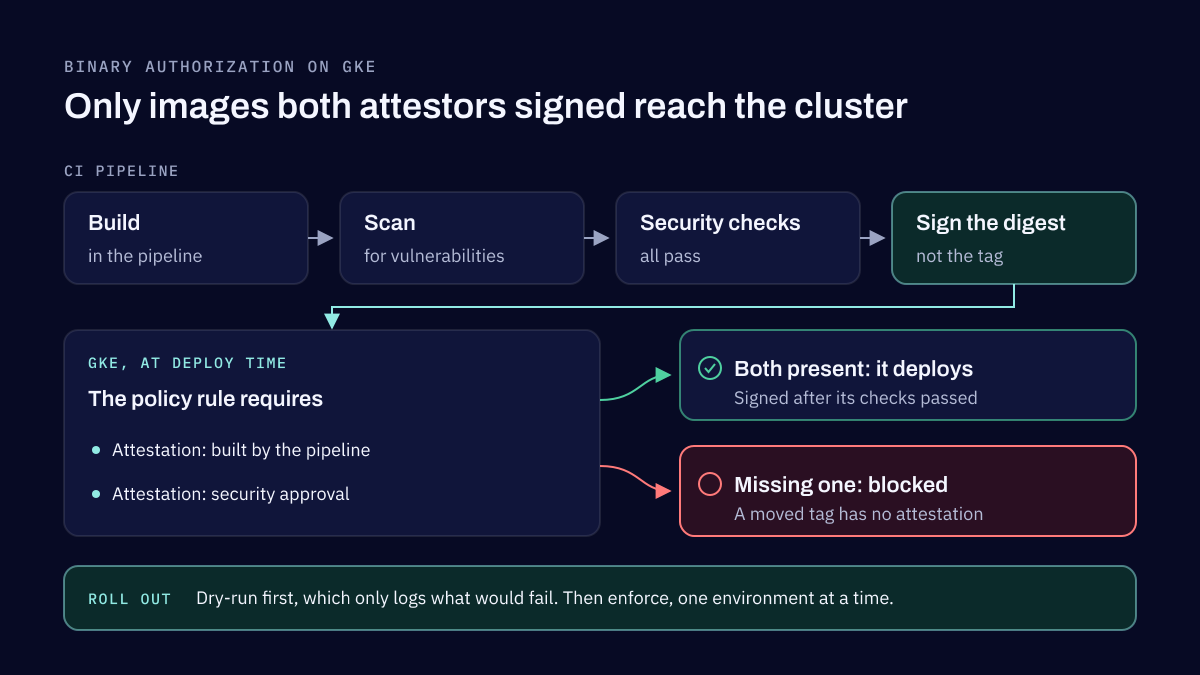
Binary Authorization makes GKE check every container image against a policy before it deploys, and lets only images signed by the attestors you trust run. Roll it out in dry-run mode first, sign image digests in CI after the build and the scan pass, and keep exemptions and break-glass for real emergencies.
Kubernetes and Containers
Shielded GKE Nodes: what they protect and what they do not
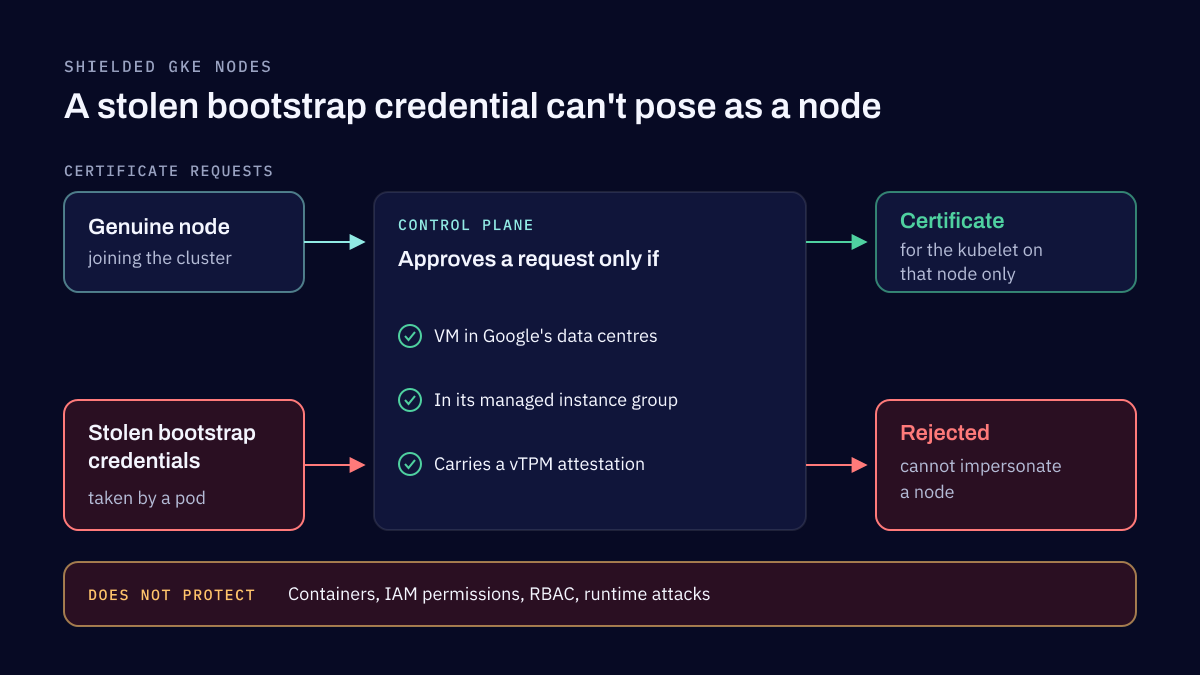
Shielded GKE Nodes prove to the control plane that each node is a genuine VM of your cluster, so an attacker who steals a node's bootstrap credentials cannot impersonate it. Secure Boot and integrity monitoring add checks on how the node started. They protect the node, not the workloads running on it.
Tell us how your software is built and shipped
Name the languages, the pipeline and where it runs. We reply within two business days.